A near miss on a local service route rarely looks dramatic at first. A driver glances down to check a phone notification, reaches toward a water bottle, or loses focus while navigating a busy intersection. The vehicle continues moving, the pet in the rear compartment stays quiet, and nobody may realize how close the route came to an incident.
That's why an in-vehicle camera monitoring system has become more than a dash cam that stores footage for later review. Modern systems watch the road and the driver, identify visible risk as it develops, and deliver coaching while there's still time to change the outcome. For pet transport and local service fleets, that shift matters because the business is carrying more than equipment. It's carrying animals, employees, and the trust of clients who expect careful handling from pickup to return.
Understanding In-Vehicle Camera Monitoring Systems
A fleet manager reviewing a near miss usually finds a familiar sequence. The road-facing video shows the vehicle approaching a turn. The driver's hands move, the vehicle drifts slightly, and another road user brakes to create space. A passive camera can preserve that sequence, but it can't interrupt it while it's happening.
An active system adds a driver-facing camera, computer vision, and real-time alerts. It can identify prolonged off-road glances, visible drowsiness, phone use, or a missing seatbelt, then warn the driver inside the cab. Some systems also route a short event clip to a manager for review and coaching. The purpose isn't to collect footage indiscriminately. It's to identify a specific behavior, intervene at the right moment, and create a fair record for follow-up.
Practical rule: Video that only helps after a crash is evidence. Video that changes behavior before a crash is part of the safety program.
The distinction is important for a dog-walking or pet transport operation. A driver may make several small decisions during a route, including checking mirrors, managing a narrow residential street, responding to traffic, and maintaining a calm environment for animals. A fleet manager can't sit in every vehicle, and a written policy can't observe every trip. A visual monitoring layer helps close that gap without requiring a supervisor to ride along.
From recording to intervention
The technology has developed from a compliance tool into a behavioral coaching platform. The road-facing camera provides context around the vehicle, while the driver-facing camera checks whether attention is directed where it should be. Software can combine those observations with vehicle signals, then distinguish a brief glance from a sustained distraction.
That doesn't mean cameras solve every safety problem. They detect visible symptoms during a trip, not every condition that existed before the driver started work. A camera can flag closing eyes, but it can't independently establish how much rest a driver had before a shift. It can identify phone use, but it can't replace sensible scheduling, supervision, and training.
The strongest use case is targeted intervention. A short audio warning can bring attention back to the road. A manager can then review only the flagged event, discuss what happened, and decide whether the driver needs a reminder, additional training, or a change in route assignment. That workflow is more useful than collecting hours of footage nobody has time to watch.
Core Components of Modern Driver Monitoring
A working in-vehicle monitoring system is a coordinated safety network, not just a camera mounted behind the windshield. It combines road and driver views, infrared sensing, local processing, communications, and a review interface. For pet transport and local service fleets, each component affects whether the system supports useful coaching or becomes another source of footage and driver frustration.
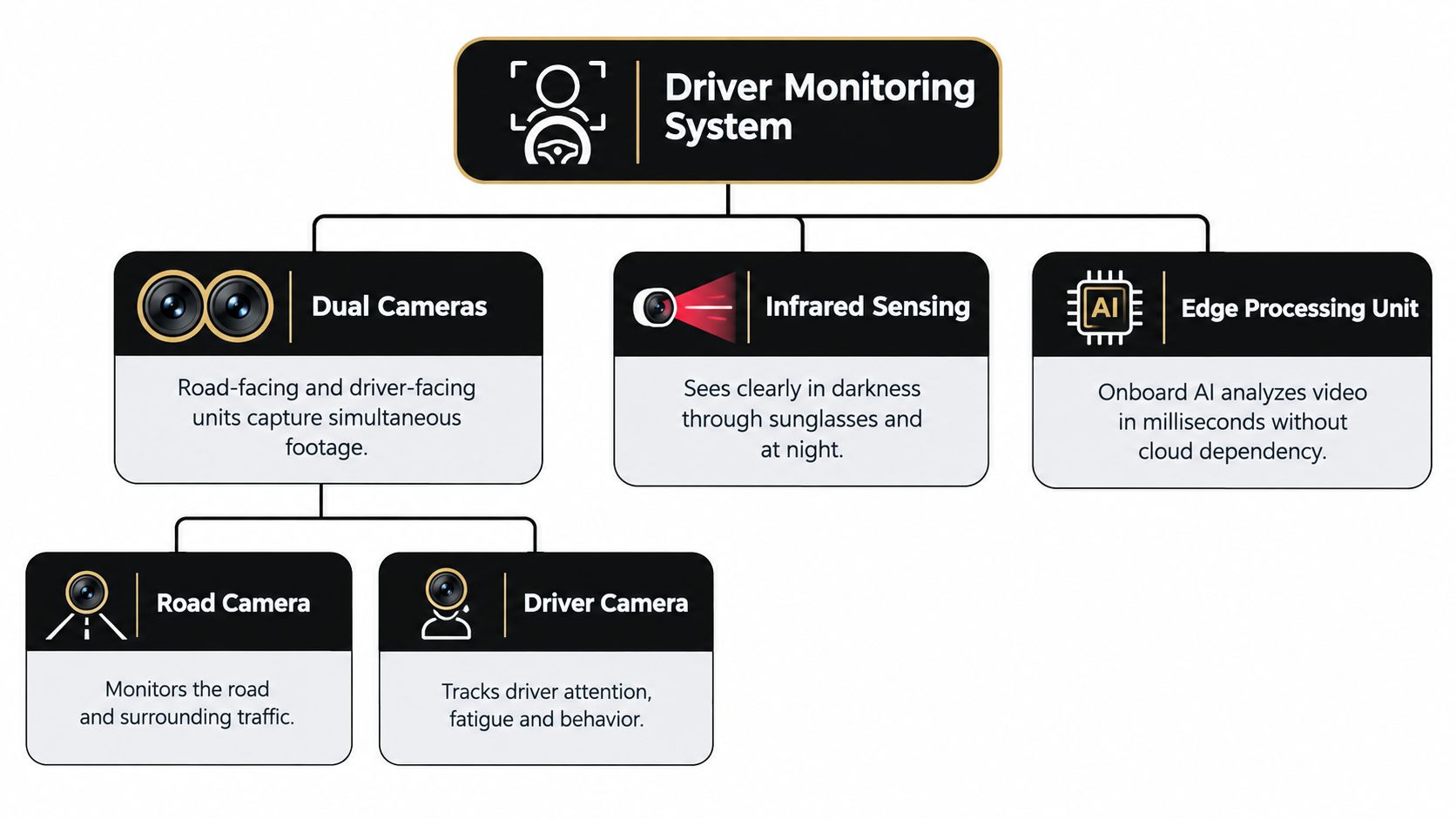
Start with dual cameras
A road-facing camera records the roadway, traffic conditions, and events around the vehicle. That view gives a manager the context needed to assess a warning involving a tight turn, a sudden obstruction, following distance, or a vehicle stopping near a pickup point. In a pet transport vehicle, it can also show whether a driver was dealing with congestion, a loading area, or an unexpected movement near the route.
A driver-facing camera monitors the person operating the vehicle. It can observe gaze direction, eyelid position, head pose, and visible device use. Together, the two views answer different operational questions: what changed outside the vehicle, and what was the driver doing at that moment?
A single outward-facing dash cam can document a collision without showing whether the driver was checking a mirror, watching a crossing, or looking down at a phone. Dual-camera coverage supplies the context needed to review behavior fairly. That distinction matters when a local technician is working through frequent stops or when a pet transport driver must maintain a calm cabin while staying attentive.
Use infrared for difficult lighting
Cabin lighting changes throughout a shift. Vehicles move from sunlight into shade, operate before sunrise, and travel at night with little visible light inside. Infrared sensing illuminates the driver's face without relying on a bright lamp that could distract the driver or disturb an animal.
Infrared or RGB cameras can support face and eye tracking at around 30 frames per second . One benchmark used an Intel RealSense D435 positioned about 1.5 meters from the driver and captured 1920×1080 images at 30 FPS across different driving situations, as described in the driver monitoring dataset research. The specification illustrates the type of hardware benchmark buyers should examine, rather than serving as a universal installation requirement.
The practical test is stable, usable performance. The camera must keep the driver's face in view during ordinary posture changes and distinguish a mirror check from a prolonged glance away. Installers should account for steering-wheel position, driver height, glare, seat adjustment, and equipment mounted near the dashboard.
Process events at the edge
An edge processing unit analyzes video inside the vehicle and identifies potential events quickly. Local analysis reduces dependence on a continuous cellular connection and supports an immediate in-cab prompt, which gives a driver an opportunity to correct attention before a manager reviews the event.
The cloud remains useful for selected clips, reporting, and coaching records. Fleet operators should avoid treating raw video as the default product. Routine footage can stay local, while defined safety events are uploaded under clear retention and access rules.
Hardware also has to survive daily service work. Vibration, temperature changes, dust, cleaning products, and repeated entry and exit can shift a camera or reduce reliability. A unit that performs well in a showroom but loses its angle on rough local routes will create false alerts, weaken coaching conversations, and reduce driver trust.
How Camera Systems Score and Coach Behavior
A pet transport driver glances down to check a crate, while a local service technician reaches for a phone at a stop. Passive video recording may preserve what happened, but it rarely changes the next decision. An AI-driven system can identify the behavior, prompt the driver while the route continues, and give a manager a focused event to review.
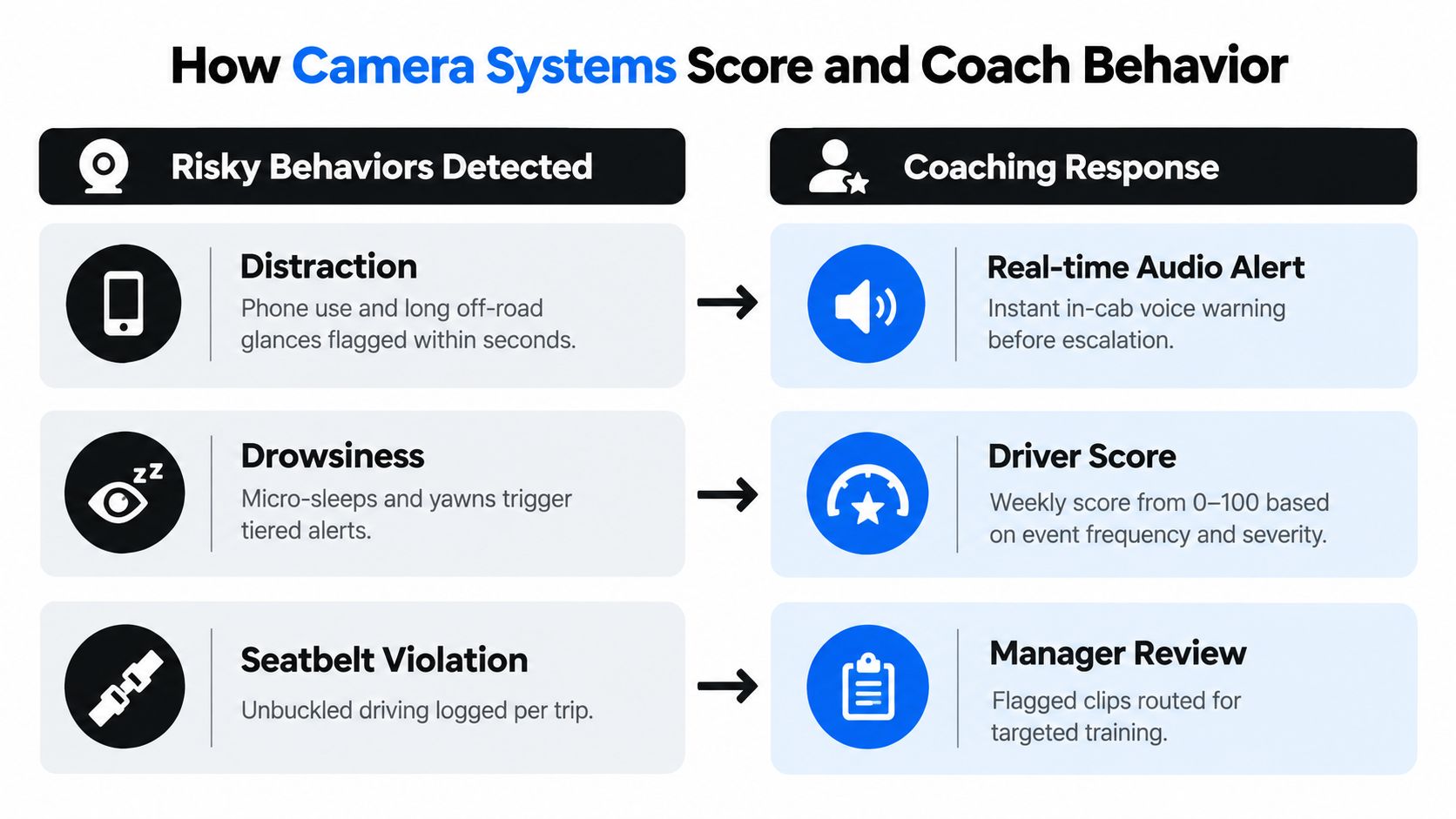
Detect defined behaviors, not vague “risk”
Useful event categories include distraction, drowsiness, phone use, and seatbelt non-compliance. Distraction logic can flag a driver who looks away from the road for more than two seconds . Drowsiness logic can examine eyelid position, gaze, head posture, and related patterns. The threshold is a starting point for review, not proof that every alert represents unsafe driving.
Drowsiness detection may use PERCLOS , eye closure, blink rate, and head position. NHTSA describes PERCLOS as a reliable and valid method for detecting driver drowsiness in the agency's assessment of drowsy-driver detection. A single blink should not trigger the same response as a sustained pattern of reduced alertness. Systems earn driver trust by combining signals and giving reviewers enough context to assess the event.
Scoring should help a manager distinguish an isolated mistake from a repeated pattern. Event frequency and severity matter more than treating every alert equally. A brief, corrected glance during a route check should carry less operational weight than repeated phone use or a prolonged drowsiness event.
Compare visual detection with indirect signals
Steering-wheel telemetry can reveal unusual movement, but it may identify a problem only after the vehicle begins to drift or the driver loses a stable path. A driver-facing camera observes attention directly, which can create an earlier coaching opportunity.
AAA found that camera-based systems alerted distracted drivers about 50 to 51 seconds sooner than indirect steering-wheel methods. During a 10-minute test drive , camera-based systems allowed about 2.25 minutes of distraction , compared with longer delays for systems without cameras, according to AAA's testing of automated driver monitoring systems.
For pet transport and local service fleets, earlier feedback matters because routes involve frequent stops, unfamiliar streets, customer interactions, and changing workloads. An alert delivered while the vehicle is still traveling normally can interrupt a glance before it becomes a lane deviation or hard-braking event. The manager still reviews the context, but prevention begins inside the cab.
Coach in layers
The first response should usually occur in the vehicle. An audio or haptic warning tells the driver which defined behavior the system detected. If the driver corrects it, the event may require no further action.
Escalation makes sense when the behavior is severe, repeated, or connected to another safety event. The reviewer should confirm the clip, consider route conditions, and speak with the driver. Effective coaching answers three questions: what the system saw, what the driver should do instead, and how improvement will be checked.
Fleet-facing AI camera systems can provide real-time coaching for distraction, fatigue, phone use, and seatbelt compliance. Some platforms also communicate high-risk events to fleet managers, as described in Powerfleet's description of Vision AI on-road coaching. The system should support a fair conversation, not replace one.
Privacy and Legal Considerations for Fleet Cameras
The phrase “Big Brother” appears quickly whenever an employer points a camera into a cab. That concern shouldn't be dismissed. It should be answered with a policy that limits collection, explains purpose, and prevents safety technology from becoming general surveillance.
A driver-facing camera can support safety coaching without creating a permanent record of every private moment. The difference depends on configuration and governance. Managers should decide what the system processes locally, what triggers a saved clip, who can access it, and when the data is deleted.
Define the data lifecycle
Before installation, write down the full path of a video event. A practical policy should answer:
- What is captured: Does the system analyze the driver continuously, record continuously, or save only event-triggered clips?
- What is uploaded: Are routine frames processed on-device while only defined safety events reach the dashboard?
- Who can review it: Is access limited to named safety, operations, or claims personnel?
- How long it remains available: Does the company delete clips after a defined retention period unless an incident requires preservation?
- How updates affect it: Can an over-the-air software update add a monitoring function or change event categories?
Recent reporting has highlighted concerns about expanded in-vehicle camera recording and monitoring features delivered through OTA updates by GM, while Japan's MLIT is moving toward mandatory DMS installation, as reported in MarkLines coverage of onboard camera developments. The lesson for fleet operators is simple. A purchase decision isn't the end of the privacy review if software capabilities can change later.
Separate safety coaching from surveillance
A transparent program tells drivers why the camera exists and what it won't be used for. The policy should explain whether managers can view live video, whether footage is used for disciplinary action, and how drivers can challenge a misclassified event. It should also cover passengers, contractors, and anyone else who may enter the vehicle.
For a local pet transport fleet, the privacy conversation includes the animals and their owners. Clients may want assurance that transport is safe, but they don't necessarily expect every routine trip to become an indefinitely stored video archive. Event-based retention and restricted access can protect both operational needs and client expectations.
A written policy should sit alongside the company's broader privacy policy, not replace it. Employees need training on the policy, and managers need accountability when they access footage. If a team can't explain why a clip was opened, the system is likely collecting more than the workflow can justify.
Real-World Benefits for Service Fleets and Pet Transport
Local service routes create a different safety environment from long-haul trucking. Drivers make frequent stops, travel residential streets, share roads with cyclists and pedestrians, and manage changing schedules. In pet transport, the vehicle also carries animals whose movement, vocalization, or anxiety can create distractions that aren't visible in a standard vehicle data feed.
A driver-facing camera can help identify whether a problem came from a phone, fatigue, a seatbelt violation, or another attention failure. A road-facing view can show the traffic context. Together, the footage gives a manager a more reliable basis for coaching than a customer complaint or a single telematics signal.
Connect safety behavior to client trust
Pet parents care about the whole journey. They want to know that a driver is attentive, that the vehicle is operated responsibly, and that the person handling their dog follows a consistent process. Monitoring doesn't prove every aspect of care, but it can support a documented safety culture.
That matters in service areas including Arvada, Denver, Englewood, Golden, Lakewood, Littleton, and Wheat Ridge . A local operator working across these communities may have many short trips in a day, each with different traffic patterns and pickup conditions. A consistent coaching system gives managers a way to apply the same expectations across routes instead of relying on occasional ride-alongs.
The financial case should also be handled carefully. Camera technology doesn't automatically lower every premium or prevent every collision. Its value depends on whether the company reviews events, coaches drivers, and uses the findings to change behavior and operating procedures.
A 2022 fleet safety survey with 3,411 responses found that 68% of dash cam users said video tracking was very or extremely effective at improving safety, while more than two thirds reported reduced insurance or accident costs, according to Persistence Market Research's fleet safety survey information.
Build evidence into the service workflow
For a pet service business, useful workflow decisions may include:
- Reviewing serious events promptly: A flagged distraction or drowsiness event should reach the right manager without forcing the team to search through an entire day of video.
- Using coaching notes consistently: The manager records what happened, what was discussed, and whether follow-up is needed.
- Protecting client communication: When a client raises a concern, the company can investigate using defined records rather than relying only on memory.
- Connecting training to patterns: Repeated alerts may indicate a need for refresher training, route changes, or a conversation about workload.
Businesses comparing practices across regions may also find value in resources on driver training for Georgia fleets, especially when they're building a formal coaching process rather than treating cameras as standalone equipment.
For local pet owners, the relevant question isn't whether a company owns a camera. It's whether the company has turned the camera into a disciplined safety routine. A service such as dog walking in Denver depends on reliable route execution, responsible handling, and clear trust signals. Camera coaching can support that promise when it remains focused on driver safety and respectful data use.
Best Practices for Deploying Camera Monitoring
Installing hardware is the easy part. The difficult work starts when drivers receive their first alert, managers open their first event clip, and the company decides whether the system exists to improve behavior or document violations.
A phased rollout gives the fleet time to calibrate thresholds and earn trust. It also prevents managers from treating the first wave of alerts as a final judgment on driver performance.
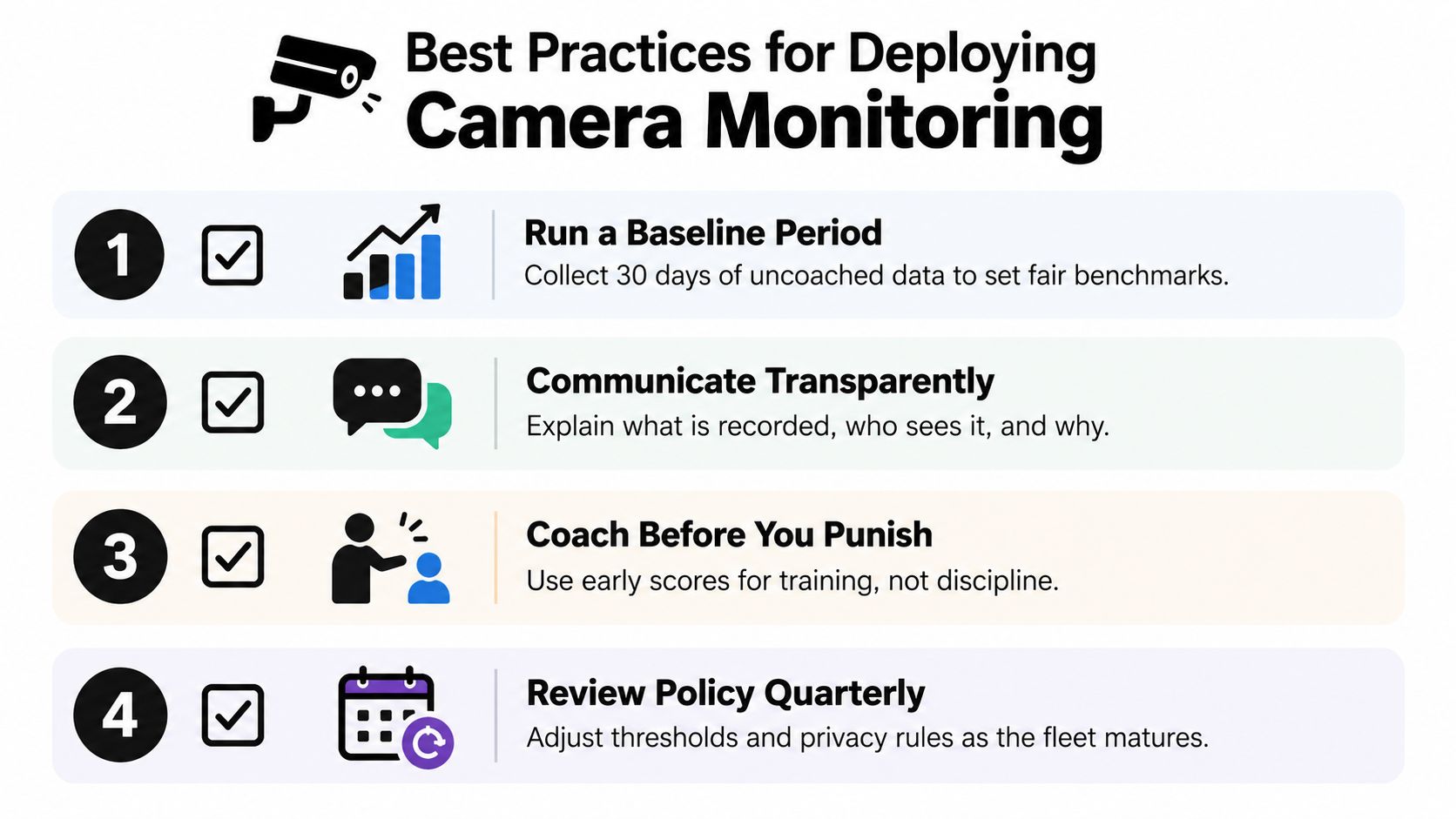
Begin with observation
Start with a baseline period in which the system records and classifies events but does not immediately trigger every coaching response. The mandatory implementation checklist illustrates a 30-day uncoached baseline, which gives managers time to see how the system behaves across routes, drivers, lighting conditions, and normal work patterns.
Use that period to identify false alerts. A camera mounted too low may misread a dashboard glance. A driver-facing view blocked by a visor may lose eye tracking. A threshold that looks reasonable in a product demo may be disruptive on a busy local route.
Explain the system before it goes live
Drivers should know where cameras are installed, what behaviors they detect, what gets uploaded, and who can review clips. Explain the difference between a real-time warning and a manager escalation. Show examples of a valid event and a questionable one.
A strong launch message frames the system as protection for drivers, clients, and animals. That framing only works if management follows through. If every minor alert becomes a disciplinary issue, drivers will reasonably conclude that the safety explanation was only a softer name for surveillance.
Coach first, escalate with evidence
During the early phase, use event clips as training material. Review patterns with the driver, ask whether the system's interpretation matches the route context, and correct installation or threshold problems before assigning blame.
Use a simple weekly routine:
- Triage: Separate urgent drowsiness, phone use, and collision-related events from low-severity alerts.
- Review: Watch the clip with road context and any available vehicle data.
- Coach: Explain the behavior and the safer alternative.
- Record: Note the discussion and any follow-up action.
- Recheck: Look for recurrence rather than assuming one conversation solved the issue.
Managers should also review driver records and authorization requirements as part of onboarding. A practical resource on getting a driving record in Colorado can support that broader screening and compliance process.
Integrate only what managers will use
Connect camera events to fleet management or scheduling software when the integration improves ownership and response. Don't add dashboards just because a vendor offers them. The useful question is whether a manager can see the event, understand its context, coach the driver, and record the outcome without duplicating work across disconnected systems.
Review alert thresholds and privacy rules quarterly. Routes change, vehicles change, software changes, and driver feedback reveals problems that weren't visible during procurement. A mature program adjusts without abandoning its core purpose.
Evaluating the Future of Fleet Safety Technology
The market is moving toward camera systems that act during a trip rather than document it afterward. The global driver monitoring system market is estimated at USD 1.91 billion in 2026 and projected to reach USD 5.17 billion by 2034 , reflecting a 13.3% CAGR , according to Fortune Business Insights' driver monitoring system market forecast. That projection signals sustained expansion across passenger vehicles, commercial fleets, and advanced driver-assistance platforms, but growth alone doesn't make every deployment effective.
Fleet managers should evaluate the operating model as carefully as the camera specifications. Ask vendors:
- What does the system detect reliably at night and in glare?
- Which processing happens inside the vehicle, and what data reaches the cloud?
- How are event thresholds configured and tested?
- Can managers distinguish a confirmed risk from a possible false alert?
- Who owns the footage and controls access?
- How long are clips retained by default?
- What changes can software updates make after installation?
- Can events connect with existing vehicle, scheduling, and coaching tools?
- What support is available when drivers challenge an alert?
The strategic choice is not passive recording versus surveillance. It's whether the fleet can use visual information for timely, proportionate coaching while protecting employee privacy and client confidence. For pet transport and local service operations, that balance is part of the service itself.
Audit the current safety stack before buying another dashboard. Review how incidents are detected, who responds, how coaching is documented, and whether your policies explain data use clearly. Then choose an in-vehicle camera monitoring system that supports the workflow your managers can sustain.
Denver Dog offers on-leash dog running, walking, and hiking services through Denver Dog Joggers and Denver Dog Hikers, with smart in-vehicle safety technology supporting real-time driver coaching during pet transport. Visit Denver Dog to explore weekday exercise and local trail services built around safe, structured care for your dog.
The Run Down